The first time I wired an LLM API into a React app, I did what everyone does: I called the endpoint, waited for the full response, and rendered it. It worked. It also felt awful to use — users stared at a spinner for 5-10 seconds before anything showed up on screen.
Streaming fixes the UX problem, but it introduces a pile of small, annoying TypeScript and state-management problems that nobody warns you about. Here’s everything I wish I’d known before I started.
Why streaming is harder than it looks
A normal API call is one request, one response, done. Streaming is a request that returns a series of chunks over time, and your UI has to:
- Render partial, incomplete text as it arrives
- Handle the stream ending (cleanly or with an error)
- Let the user cancel mid-stream
- Not re-render on every single token like a maniac
- Deal with chunks that don’t line up with “one word” or “one sentence” boundaries
None of this is conceptually hard. It’s just fiddly, and if you don’t set it up right you end up with laggy UIs, memory leaks, or state bugs that only show up when a user clicks “stop” at the wrong moment.
Step 1: Reading the stream itself
Most LLM APIs (Claude, OpenAI, etc.) stream responses as Server-Sent Events (SSE) over a fetch call. The raw response body is a ReadableStream<Uint8Array> — bytes, not text, and definitely not parsed JSON.
Here’s a minimal reader that turns that into usable chunks:
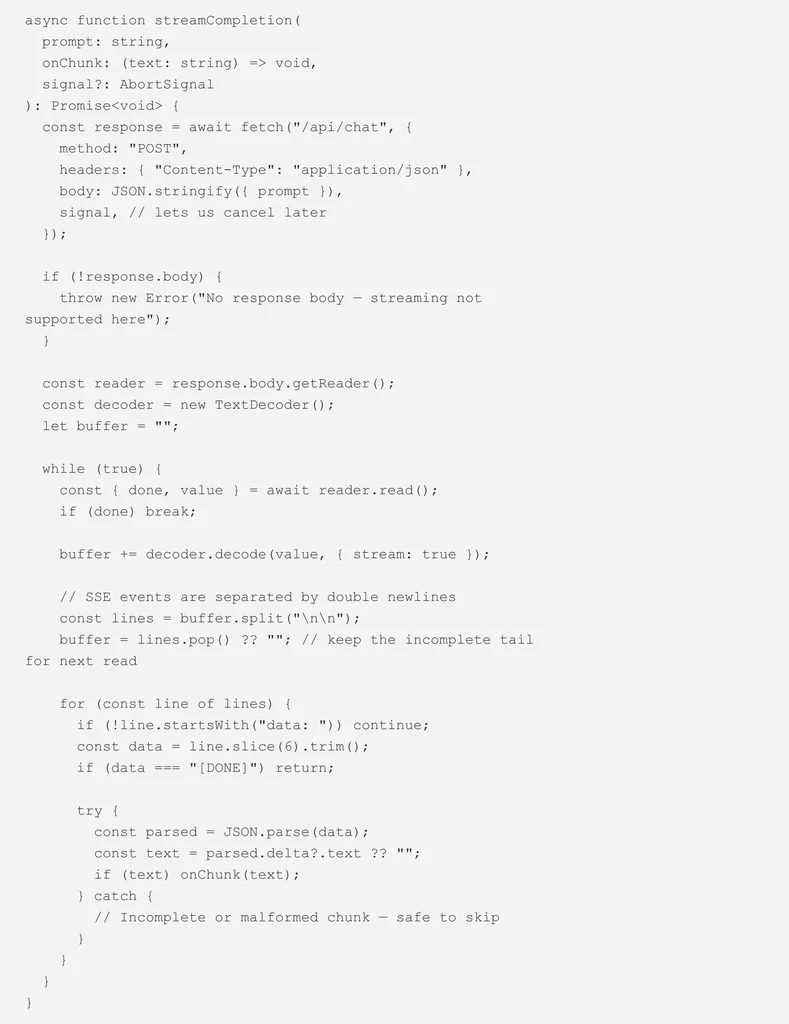
A few details that matter here, because I got each of them wrong at least once:
- `{ stream: true }` on `decoder.decode` — without this, the TextDecoder assumes each call is a complete, standalone chunk and will mangle multi-byte characters (like emoji) that get split across two network chunks.
- The buffer/leftover pattern — network chunks don’t align with SSE event boundaries. You will frequently get half an event in one read() call and the rest in the next. Always keep the incomplete tail around instead of trying to parse it immediately.
- Wrapping `JSON.parse` in try/catch — same reason. A chunk boundary can land in the middle of a JSON payload.
Step 2: Getting the state management right in React
The naive approach is to call setState on every chunk:

This technically works, but on a fast stream you can get dozens of re-renders per second, each one triggering React’s reconciliation, layout, and paint. On a long response, this is where the “laggy” feeling comes from — it’s not the network, it’s the render thrashing.
What I do now: batch chunks with a ref and flush on a short interval instead of on every token.
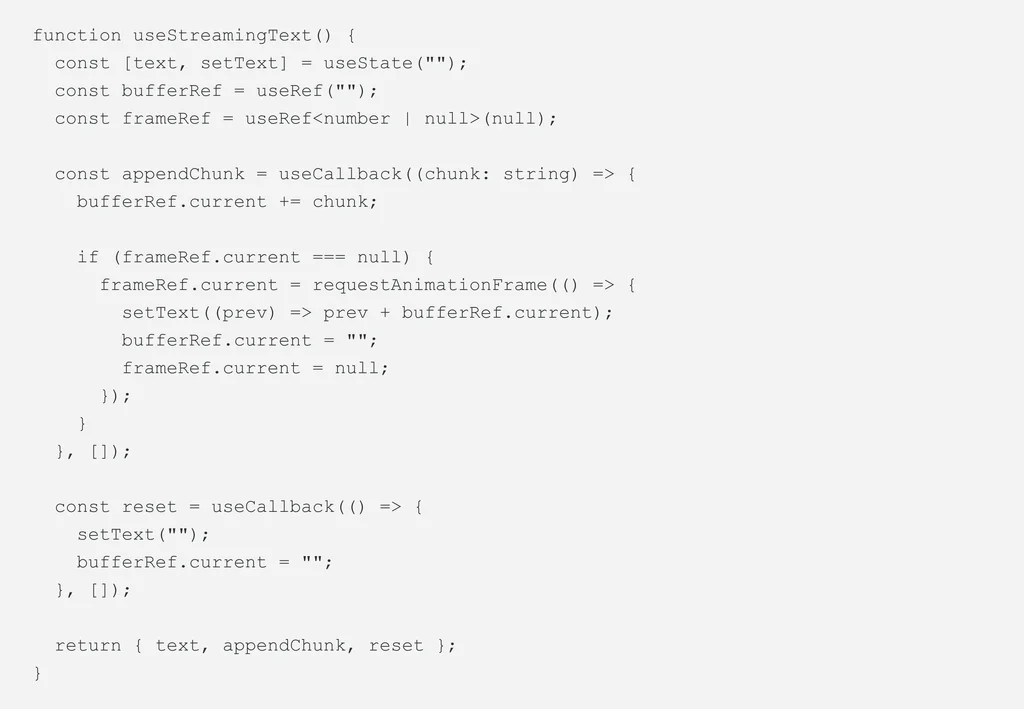
Using requestAnimationFrame instead of a fixed setInterval means you never batch more than one paint frame’s worth of updates, so the text still feels live — you just stop paying for renders the browser can’t even show yet.
Step 3: Modeling the state as a union, not a pile of booleans
This is the same lesson that applies everywhere in TypeScript: don’t model streaming state with a handful of independent booleans.
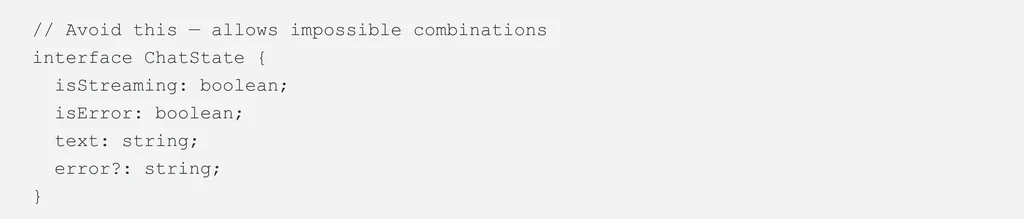
What happens if isStreaming and isError are both true? What if the stream is cancelled — is that an error or not? You end up writing defensive checks everywhere to handle states that shouldn’t exist.
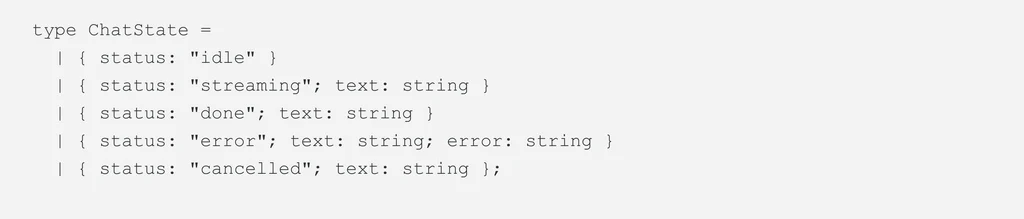
Now every place that reads ChatState gets exhaustive checking for free, and “cancelled mid-stream” is an explicit, first-class state instead of a special case bolted onto isError.
Step 4: Making cancellation actually work
Users will click “stop” mid-response. If you don’t handle this, you’ll either keep burning API costs on a response nobody’s reading, or you’ll get a React warning about setting state on an unmounted/stale component.
The AbortController from Step 1 handles the network side. On the state side, just make sure your reducer treats cancellation as a clean transition, not an error:
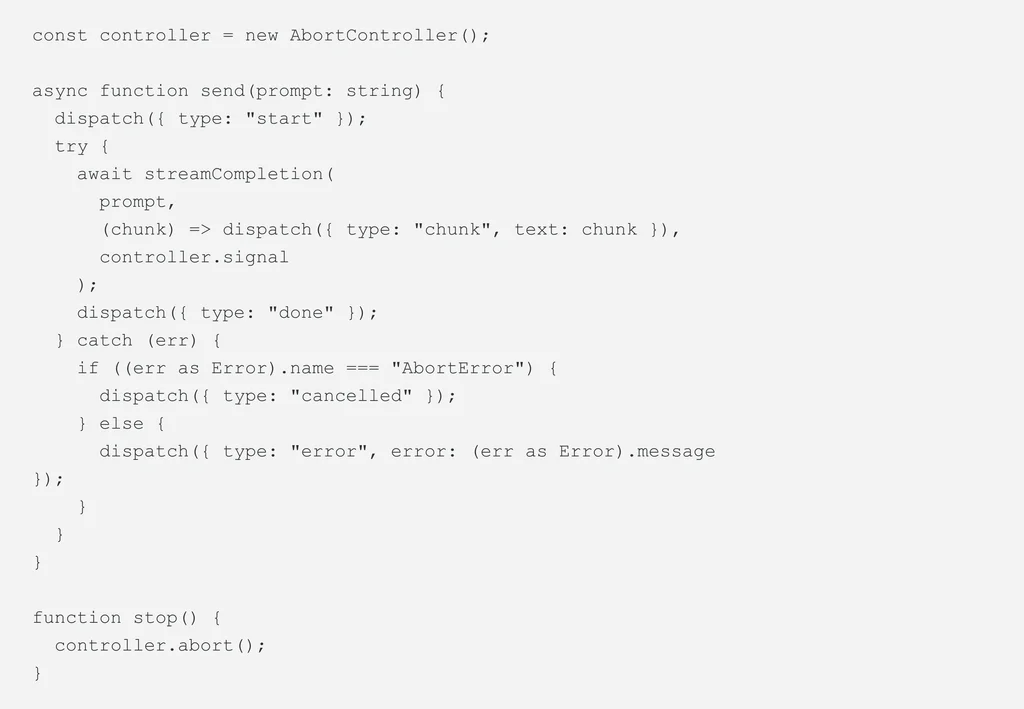
Checking err.name === “AbortError” specifically matters — without it, a user-initiated cancel gets funneled into your generic error state and shows a scary “Something went wrong” message for something the user did on purpose.
The common thread
Streaming isn’t hard because the concept is hard — it’s hard because it’s made of several small, easy-to-miss details: byte decoding edge cases, render batching, state modeling, and cancellation. Get each of those right in isolation and the whole thing stops feeling fragile.
If you’re building this today, my honest advice: write the raw stream reader once, test it against a slow/throttled network to force chunk-boundary bugs to show up, and only then start building UI on top of it. Debugging a chunking bug through three layers of React state is a bad time — debugging it in one small function is not.
Build smoother, faster AI-powered React experiences with robust LLM streaming. Explore how to get started with Byteridge!