Modern automation frameworks run thousands of UI and API tests daily. Execution speed has improved significantly, but failure investigation still eats up a disproportionate chunk of an automation engineer’s time.
A failed test rarely tells the full story. A missing UI element on screen might actually trace back to a sluggish backend service, an infrastructure hiccup, a bad deployment, or an expired auth token. Engineers end up manually stitching together evidence from Playwright traces, screenshots, logs, monitoring dashboards, CI/CD pipelines, and API responses – a process that can stretch from minutes into hours.
AI-assisted Root Cause Analysis (RCA) short-circuits this by automatically correlating signals across systems and surfacing the most probable cause. Teams spend less time searching and more time fixing.
Why Traditional Debugging Breaks Down
As applications shift toward distributed architectures, failures stop having a single obvious origin. They can emerge simultaneously from any layer of the stack:
- Dynamic UI rendering
- Backend microservices
- Databases
- Third-party integrations
- Cloud infrastructure
- CI/CD deployments
- Authentication providers
A failing UI assertion is often just the symptom. The actual problem might be three layers deeper. Common failure categories that engineers encounter include:
- Unstable or changed locators
- API timeouts and service outages
- Infrastructure resource exhaustion
- Authentication and session expiry issues
- Deployment regressions
- Database connection failures
- Network instability
- Flaky asynchronous behaviour
Without a centralised way to correlate evidence, each of these requires manual investigation across separate tools – driving up Mean Time to Resolution (MTTR).
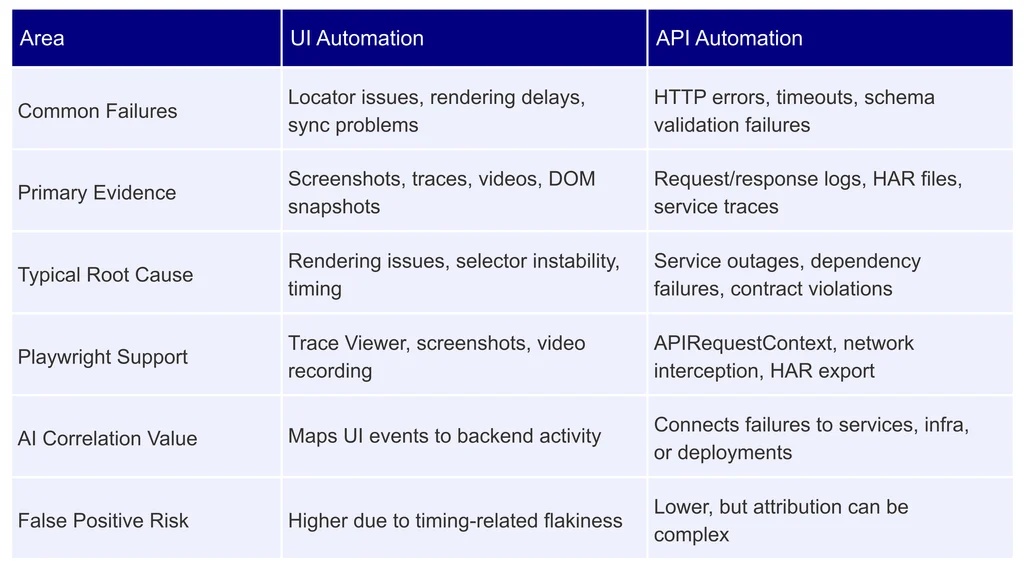
UI vs. API Automation Failures
The nature of failures – and the evidence available – differs significantly between UI and API testing:
Playwright Debugging Essentials
Playwright ships with a strong set of built-in artifacts that make troubleshooting tractable. For any meaningful RCA pipeline, you want to capture all of these on failure:
- Full-page screenshots
- Session recordings (video)
- Trace Viewer archives (.zip)
- Network logs
- Browser console logs
- DOM snapshots
- HAR files
Why Trace Viewer is the Most Valuable Artifact
Trace Viewer bundles test actions, network requests, console output, screenshots, DOM state, and an execution timeline into a single replayable session. For AI-driven RCA, it’s the richest input available because it preserves the exact application state at the moment of failure – not just after the fact.
Example: AI-Assisted RCA in Practice
UI Failure
Observed failure:

Traditional diagnosis: locator issue – update the selector.
AI-assisted RCA result:
The checkout button existed in the DOM but stayed disabled because the Cart Summary API exceeded its response threshold.
- API Response Time: 3,847 ms
- Expected Threshold: 3,000 ms
- Root Cause: Backend latency prevented component render
- Recommended Owner: Backend Team
The selector never needed to change. The fix belongs to the team managing API performance.
API Failure
Consider an API response like this:

Manually diagnosing this means checking application logs, database metrics, service health, deployment history, and infrastructure monitoring separately.
AI-assisted RCA result:
A deployment released four minutes before the failure increased connection pool usage without updating database connection limits. 340 concurrent requests exhausted the available pool.
- Root Cause: Deployment configuration defect
- Recommended Owner: Platform Engineering Team
What typically takes hours of cross-system investigation is reduced to minutes.
Intelligent Failure Correlation
The real leverage AI provides isn’t reading logs faster – it’s connecting information across systems that normally live in silos. A correlation engine draws on:
- Playwright traces
- Screenshots and session videos
- HAR files
- API responses
- Service logs
- Infrastructure metrics
- Deployment events
- CI/CD pipeline history
The system builds a unified timeline and identifies relationships between events – surfacing patterns that no individual log would reveal on its own.
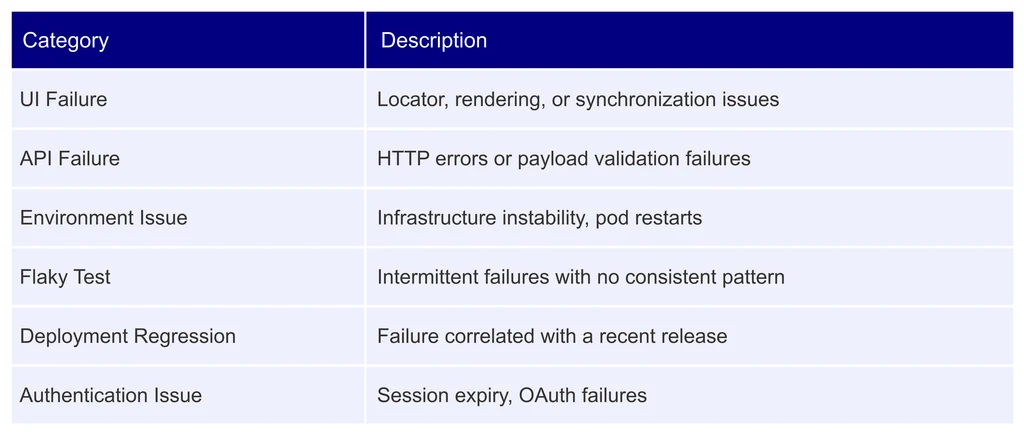
Failure Classification
Accurate classification routes incidents to the right team immediately:
Best Practices for AI-Assisted RCA
Use Stable Test Identifiers
Prefer data attributes over CSS classes or XPath expressions. They survive visual redesigns and remain meaningful to AI correlation systems:


Collect Rich Failure Artifacts
Every test failure should capture:
- Screenshot
- Trace (.zip)
- Session video
- Network logs
- Environment details (OS, browser version)
- Build information
- Commit SHA
The more context you preserve at failure time, the more accurate the RCA output will be.
Invest in Observability
AI-assisted RCA is only as good as the telemetry feeding it. The most effective setups combine:
- Structured JSON logging (avoids unstructured log correlation problems)
- Distributed tracing with consistent trace IDs across services
- OpenTelemetry instrumentation
- Consistent, synchronised timestamps
- Active service health monitoring
Better observability has a direct, measurable impact on RCA accuracy.
Challenges to Consider
Even sophisticated AI systems hit real limits when the underlying data quality is poor:
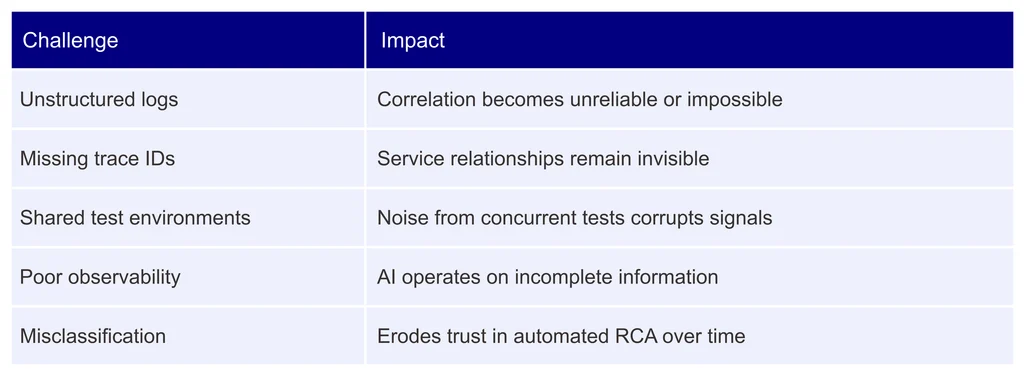
The tools are powerful, but they amplify good engineering practices – they don’t replace them.
Conclusion
AI-powered debugging changes the economics of test failure investigation. By correlating Playwright traces, logs, network activity, deployment events, and infrastructure telemetry into a unified picture, teams move from reactive firefighting to targeted root cause analysis.
The biggest gains don’t come from replacing engineers – they come from eliminating repetitive investigation work. When backed by solid observability practices and structured test artefacts, AI-assisted RCA meaningfully reduces MTTR, improves failure classification accuracy, and builds confidence in automation results across both UI and API testing.
Going forward, the most effective automation teams won’t just run tests. They’ll operate intelligent debugging ecosystems that identify, explain, and route failures automatically – freeing engineers to focus on the work that actually matters.