For modern web automation frameworks, authentication is one of the most common and repetitive activities performed during test execution. Most automation scripts begin with entering a username, password, clicking the login button, and waiting for successful navigation. While this approach works effectively, repeatedly executing the login flow in every test increases execution time and introduces unnecessary dependency on UI elements.
Playwright provides a more efficient mechanism by allowing authentication handling at the API level. Instead of interacting with login fields through the user interface for every test case, we can capture the authentication token generated from the login API response and inject it directly into browser storage.
This technique allows test execution to bypass the login page and directly navigate to any desired application page or module. As a result, authentication becomes faster, more stable, and easier to maintain.
Why Use Token-based Authentication Handling?
Using authentication tokens in Playwright provides several advantages:
- Reduces overall test execution time
- Eliminates repetitive login actions
- Minimizes dependency on UI login elements
- Improves test stability and reliability
- Supports API and UI integration within a single framework
- Enables direct navigation to target pages
- Reduces maintenance effort for automation suites
Step-by-Step Authentication Workflow Overview
The complete authentication flow works as follows:
Step 1: Send a login API request using Playwright API Context
Step 2: Pass user credentials in the request body
Step 3: Capture the authentication token from the API response
Step 4: Store the token value
Step 5: Inject the token into the browser’s local storage
Step 6: Navigate directly to the required application page
Step 7: Execute remaining UI automation without login execution
Authentication Token Extraction Code
The following code performs an API login request and extracts the authentication token from the API response.
const loginPayload = {

    userEmail: "xxxxxxx@mail.com",

    userPassword: "xxxxxxxx"}

let tokenValue;

test.beforeAll("Login API Token", async () => {

    const apiContext = await request.newContext();

    const loginResponse = await apiContext.post(

        "https://rahulshettyacademy.com/api/ecom/auth/login", {

            data: loginPayload } );

    expect(loginResponse.ok()).toBeTruthy();

    const loginResponseJson = await loginResponse.json();

    tokenValue = loginResponseJson.token;

    console.log(tokenValue);

});
Authentication Token Code Walkthrough
Now, let’s understand how this code functions and delivers the authentication tokens that we need:
- “request.newContext()” creates a separate API request context in Playwright.
- “post()” sends an HTTP POST request to the authentication endpoint.
- “data” contains the request payload that includes login credentials.
- “expect(loginResponse.ok())” validates whether the API request was successful.
- “response.json()” converts the response body into JSON format.
- “loginResponseJson.token” extracts the generated authentication token.
- The token value is stored inside “tokenValue” for later use.
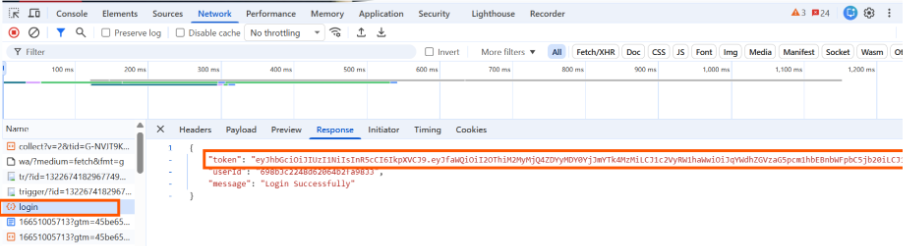
Visual Representation of Login Response
How to Use Extracted Token to Skip Login Process
After retrieving the token, we can inject it into local storage before the application page loads.
test('Inject Token and Place Order ', async ({page}) => {

await page.addInitScript(value => {

window.localStorage.setItem("token", value)}, tokenValue);

await

page.goto("https://rahulshettyacademy.com/client/#/dashboard/order?prop=%5B%226960eac0c941646b7a8b3e68%22%5D");

await page.locator("input[type='text']").nth(1).fill("Credit Card Number");

await page.locator("input[type='text']").nth(2).fill("Card Holder name");

await page.locator("input[placeholder*='Select']").pressSequentially("India"); await

page.locator('a.action__submit').click();   })
Local Storage Injection Code Explanation
The goal of the code above is to push the token into local storage.
- “addInitScript()” executes before page loading and injects the authentication token into the browser’s local storage.
- “window.localStorage.setItem(“token”, value)” stores the token, allowing the application to recognize the user as an authenticated user.
- “page.goto()” directly navigates to the required application page without executing the login flow.
- Playwright automatically fills the required order information such as card number, card holder name, and country details.
- The submit button is clicked to complete the order process and continue the test execution flow.
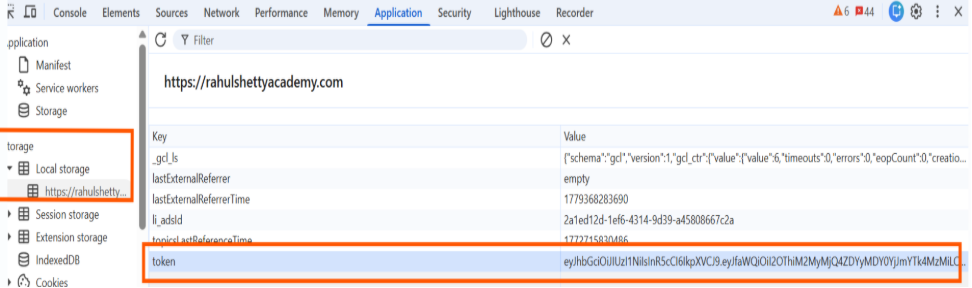
Visual Representation of Inject Token in Local Storage
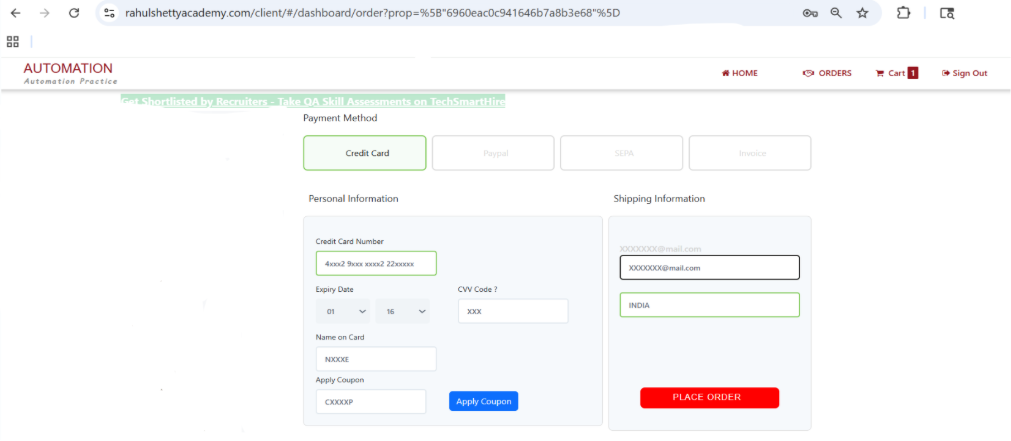
Visual Representation of UI Testing directly to payment Method skipping Login, Dashboard page
What Technical Assets Does This Technique Leverage
Most modern web applications use token-based authentication mechanisms such as:
- JWT (JSON Web Token)
- Session Tokens
- OAuth Authentication Tokens
- Access and Refresh Tokens
When a user logs in successfully, the backend service generates an authentication token and stores it in browser storage such as:
- Local Storage
- Session Storage
- Cookies
During future requests, the application validates the token instead of requesting credentials repeatedly. Playwright leverages the same concept to simulate an authenticated session.
Conclusion
Efficient authentication handling is a practical optimization technique in Playwright automation. By integrating API and UI workflows together, testers can bypass repetitive login steps and focus directly on validating core business scenarios.
This approach not only improves framework performance but also aligns with modern automation practices where speed, stability, and maintainability are critical success factors.
Leveraging authentication tokens effectively can significantly enhance the performance and scalability of large automation suites.
Take your Playwright automation to the next level with API-based authentication for more efficient and maintainable testing.